Now onboarding pilot customers
AI employees that work in the cloud, in plain sight.
Each AI employee has their own computer, accounts, and budget. They do the work on their own, check with you on what matters, and if they get stuck, you take over. We’re in pilot: computers, live screens, and phone calls still run in test mode, and we label that on each page.
- GDPR-compliant · your data in the EU
- A human in charge
- Everything is logged
 skyseatLive
1 thing needs you
Asks for approval · now
Wants to send a $49 refund to a customer whose order arrived broken. Photos attached.
Marco sent the refund and recorded it in the Activity log.
- Laura
Accounting - Marco
Customer support - Sofia
Marketing - Diego
Sales - Your next hire
Ready in minutes
How it works
Like hiring someone, but in minutes
-
1
Pick the role
Accounting, customer support, purchasing, marketing… Share the accounts they need and set a spending cap.
-
2
They work on their own computer
A real desktop in the cloud (in pilot): browser, apps, and files. They use your company’s websites and tools, even ones with no integration.
-
3
You decide
They handle routine work on their own. What matters lands in your Inbox and on your phone, with an approve button. And, in pilot, you can watch their screen anytime.
Demo
Two minutes of demo
Hartley Motors, a sample auto repair shop in Austin, Texas, approves a refund, hires a receptionist, teaches them how the shop works, watches the team at work, and sees what the month was worth. All in the real dashboard, with sample data.
The product
Your AI team, on one screen
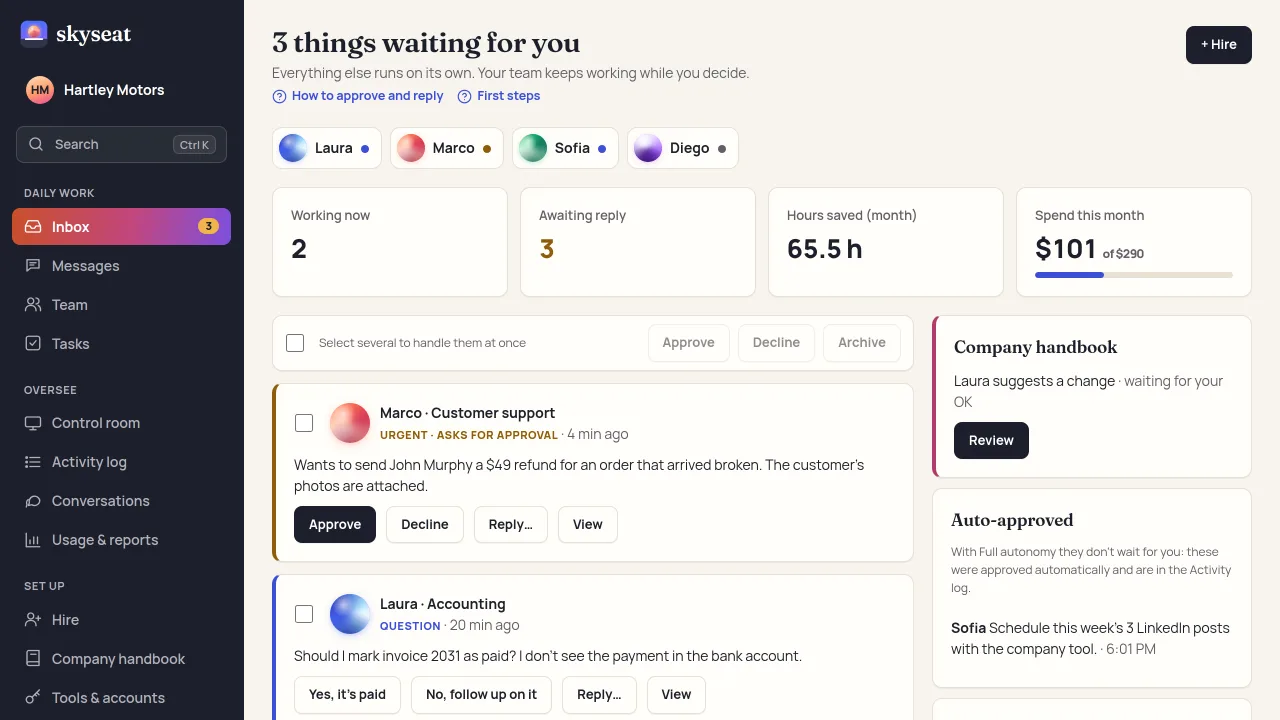
The Inbox is your home: it only shows what needs a person. Approvals, questions, and alerts take one tap, from your phone too. Everything else just runs.
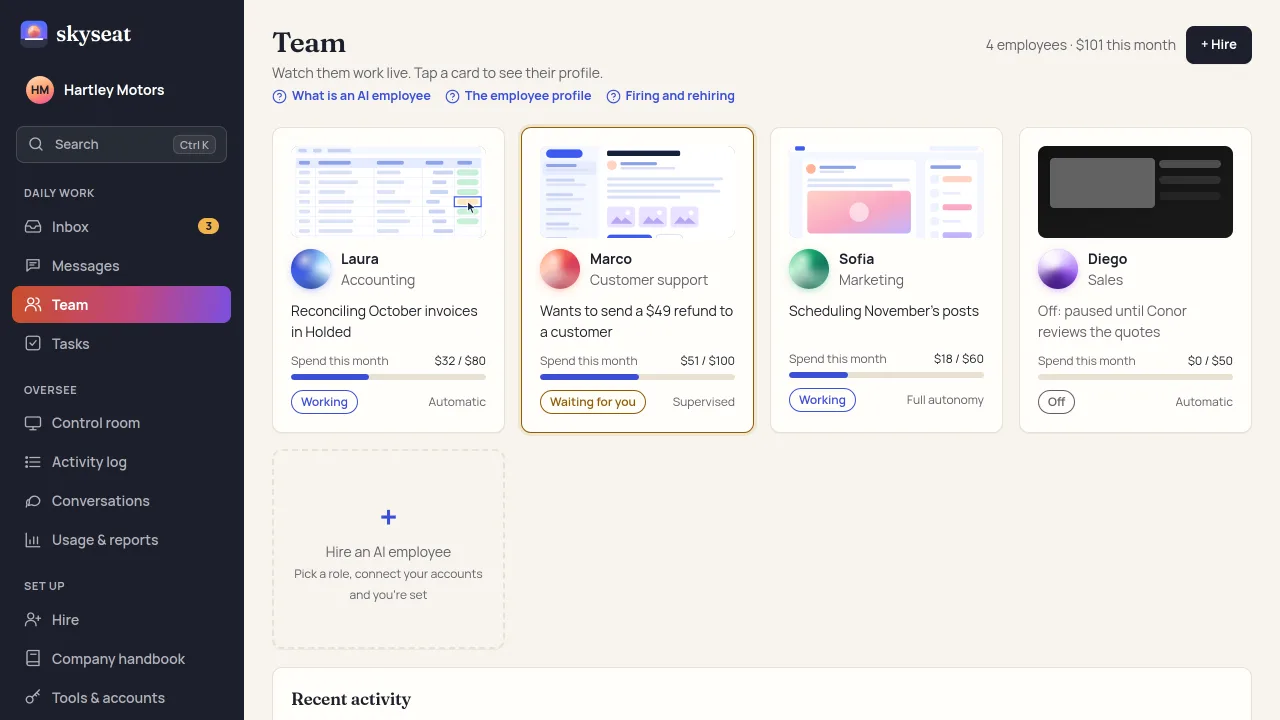
Team: every employee with their screen (in pilot), what they’re doing, their status, and their spend against their cap. With no work to do, their computer shuts down and stops costing you.

Control room (in pilot): every screen at once, like security cameras. If someone needs your OK, their screen lights up; if they get stuck, you take control and hand it back with a note.
Real dashboard, sample company.
Control
Autonomy, yes. Without losing control.
Permissions that fit
You choose what they do alone, what they ask you about, and what’s off-limits. Start supervised and give them more freedom as you build trust.
A budget per employee
Each one gets a monthly cap for AI, computer, and payments. When they hit it, they stop and let you know.
A log that can’t be erased
What they did, when, with which account, and who approved it—with screenshots. For reviews, audits, and your clients.
Take control
If they get stuck on a CAPTCHA or an odd app, you jump into their screen (in pilot), sort it out, and hand it back.
Work you can trust, by design
Every task is logged, every important step needs your OK, and your data is hosted in the EU (another region on request), under GDPR. Their computers, in pilot, are in the EU too. The AI model only sees what each task needs, and anyone talking to your AI employee knows they’re talking to an AI.
The right model for each task
Powered by Claude, from Anthropic: a fast, low-cost model for routine work and the most capable one for hard tasks. You choose which one handles each type of task.
For agencies
Put AI employees to work for your clients
If you build automations for other companies, skyseat gives your AI employees a home and gives your clients the peace of mind they want.
- One client, one team. Separate accounts, rules, and data; nothing gets mixed up.
- Cost per client. See what each one spends and what you bill them.
- Client reports. Tasks done and hours saved (estimated), ready to send.
- Your client in charge. They can approve and watch without touching your setup.
Pricing
Custom pricing for your team
Every company works differently, so we tailor the price to the size of your AI team and the hours they’ll work.
- You pay for work done, not for computers left on.
- You set a cap and never pay more than you decide.
- We show you the platform and give you a price in a short call.
By industry
AI employees for your kind of business
See a day of work for your industry: the problem, what the AI employee does, and how you stay in control.
FAQ
Frequently asked questions
What exactly is an AI employee?
An AI agent with their own identity and their own cloud computer (in pilot). They take assignments from the dashboard (on your phone too), use your company’s tools, and ask for your approval when what they’re about to do has consequences.
What if they make a mistake?
They won’t do anything important without your OK, they have a spending cap, and everything they do is logged. You can pause them at any time and, in pilot, take over their screen.
Where is my data?
By default, on servers in the European Union (Germany and Finland). If you need another country or region, such as the US, we can host your data there on request: tell us what you need. To think, the AI model (Claude, from Anthropic, in the US) only gets what each task needs: every provider is listed under subprocessors. You share your accounts with specific permissions, and you can revoke access instantly. The full picture is under trust center.
How much does it cost?
It depends on the size of your team: we’ll put together a custom price. You pay for the hours your AI employees work, not the time their computer is on, and never more than the cap you set. Request a demo and we’ll walk you through it.
What does support look like?
A real person on the skyseat team answers you. Write to us from the dashboard (Help & support › Write to the team) and we’ll reply within 1 business day. To see whether everything is working right now, check the status page.
What tools can an AI employee use?
In pilot: most of what a person does on a computer, such as browsing any website, using email and calendars, and working in the accounts you share with them. Google Workspace, Microsoft 365, HubSpot, and your accounting tool are in testing or coming soon, and the panel says so. They only get the access you grant, and what you mark as needing your OK waits for you. You can revoke access at any time.
Are you SOC 2 or HIPAA compliant?
Not yet, and we’d rather say so. We don’t have SOC 2 or a HIPAA agreement today: SOC 2 Type I is planned, and the status of each step is in the trust center. If you handle regulated data, talk to us before you start.
What can’t it do yet?
It doesn’t decide on its own about money, contracts, or anything you marked as needing your OK, and it makes mistakes, which is why every step is logged and you can step in. We don’t offer a phone-call-only service or on-premise installs yet, and we’re not ready for regulated health records. Tell us what you need and we’ll say honestly if it fits.
When can I use it?
We’re opening in batches, starting with the first businesses and agencies on the list, with a paid pilot. Request early access, tell us who you are, and we’ll get in touch. In this first phase, computers, phone, each employee’s own email, and the Microsoft and Google connections run in test mode: the dashboard labels them, and we’ll let you know as each one goes live. Already have an account? Log in here.
Your team grows. You stay in charge.
We’re opening skyseat in batches to businesses and agencies.
Where your data lives, how it’s encrypted, and what’s coming in security: trust center.