 skyseat
Help center › Get started
Agencies: your first week, from sign-up to billing
Sign-up, your first client with their team, approving from your phone, a report with your brand and what you charge each client.
Six steps for a new agency, in this order. In the panel, the agency’s Inbox and “My clients” also carry a five-step list that ticks itself off.
1. Sign-up
You open the sign-up link that reaches your email, choose your password and enter the panel. From then on your agency is a company like any other, with “My clients” in the menu.
2. Your first client
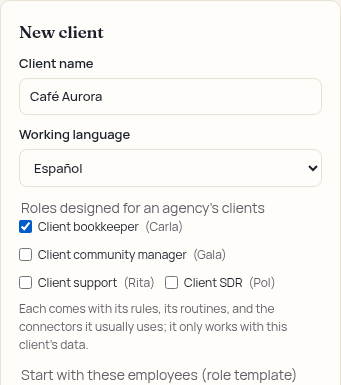
- In “My clients”, press + New client and enter their name and language.
- Press + Add client. Your plan limits how many clients you can have.
3. Their first employee, from a template
In the same form, tick the roles they start with, beginning with the ones made for agency clients: each arrives already set up, with its rules, routines and connectors, and works only with that client’s data. Later, to add another, open the client from their card and go to “Hire”.
4. Approve from your phone
- Install the panel on your phone and turn on notifications in “Account › Your access”.
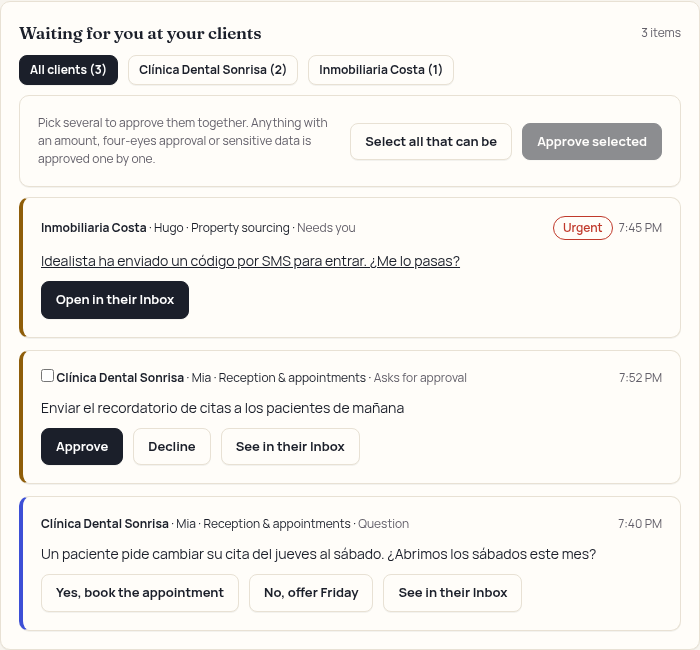
- What the employees of all your clients are waiting on shows in the Waiting for you at your clients block, urgent first. Press Approve or Reject on each notice.
Anything involving money or two-person approval still asks for the same, and every action is logged in the client’s activity log with your name. See The Inbox: answering and approving.
5. The report with your brand
- In “Your brand”, press Upload logo (PNG, JPEG or WebP).
- On the client’s card, turn on With your brand and press Monthly report or PDF with your brand. It carries your logo and never prices or margins.
6. What you charge each client
On each client’s card, enter what you charge them per month. The card shows the estimated cost and your margin, and the top of “My clients” shows the month’s margin for your whole portfolio. It is only for your agency: the client never sees it.
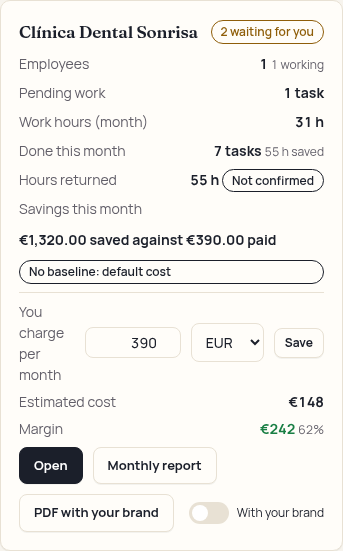
The agency summary PDF and the portfolio report come from the same place.
Questions? Book a demo and we’ll walk you through it. Book a demo Request early access