 skyseat
Help center › Stay in control
What your employee does alone and what it asks you
Choose, function by function, what it does alone and what it asks you, and undo what can be undone. Money and sensitive matters always ask for permission.
Besides the autonomy mode (Permissions, autonomy and spending caps), you can decide function by function. In the employee’s profile, under Rules & permissions › What they do alone and what they ask you, each function has two buttons: Asks for approval and Does it alone. Only admins can change them.
Which functions appear
Nobody fills in the list: it builds itself from what the employee really does, that is, from the integrations it can act with and from what it has already asked you. A new action appears the first time it asks you for permission. If you choose nothing, each function does what its autonomy level says. Today these can appear:
- Post on social media.
- Reply to reviews and comments on social media.
- Reply to 4- and 5-star Google reviews, and separately to 3-star ones.
- Reply to customers in support and on WhatsApp.
- Create events in its calendar, either without inviting anyone or inviting other people.
Letting it do it alone
Press “Does it alone” on the function and confirm. From then on that kind of action is approved automatically, at any autonomy level, and recorded in the Activity log. Going back to “Asks for approval” is immediate, and it also stops what goes out without asking by default, such as replying to customers in support or on WhatsApp.
You can also do it from a notice in the Inbox: next to Approve you will see Approve and let them do it alone from now on.
Undo
In the same card, “Latest things done alone” shows what it has done without asking you. Where possible there is an Undo button: a post is withdrawn as long as it has not gone out, and an event with no guests is removed from its calendar. What has really gone out (a message, a reply, an invitation) cannot be undone, and the card says so. Everything stays in the Activity log.
What always asks for permission
Even if you set a function to “Does it alone”, these still wait for you:
- Money: payments, purchases, collections and discounts.
- Deleting, and sensitive data (personal, health and payroll).
- Anything under four-eyes approval.
- 1- and 2-star reviews, sensitive ones, and replies that promise something.
- Case-by-case sensitive matters, such as an angry customer or a promise, and anything with an amount or a flagged risk.
Spending caps, the schedule and your company’s rules do not change with these buttons either.
Reports: ask for them or schedule them
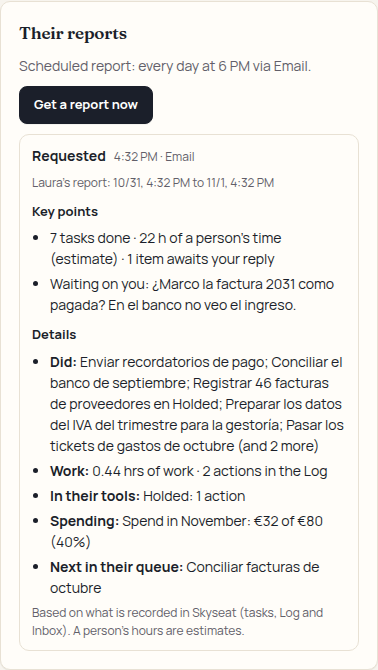
Besides notifying you, each employee can give you a report with the key points on top (what they did, what is waiting for a person, and whether they are nearing their limit) and the details below (what they did, with which tools, spending, and what comes next). The platform writes it from what is recorded in their tasks and the Log, not from what the employee says, and without using AI.
- Ask for it now: in their profile, Voice & reporting › Their reports › Get a report now. It covers everything since the previous report (a week at most; for the first one, the last 24 hours). Anyone who can assign them tasks can ask, up to 10 per hour.
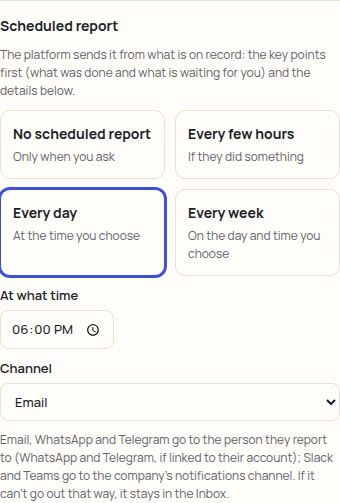
- Schedule it: in the same tab, Scheduled report (company admins only). Choose Every few hours (only if they did something), Every day or Every week, with the time and day. If you choose nothing there is no scheduled report: it only comes out when you ask.
- Where it goes: Inbox, email, Slack, Teams, WhatsApp or Telegram. Email, WhatsApp and Telegram go to the person they report to (WhatsApp and Telegram, if they have linked them to their account); Slack and Teams, to the company alerts channel.
If it cannot go out through the chosen channel (not connected, the person has not linked it, or on WhatsApp they have not written in over 24 hours), the report is not lost: it stays in the Inbox, with the reason. There it appears under “Reports from your employees” until you mark it as read.
Questions? Book a demo and we’ll walk you through it. Book a demo Request early access